Skip to content

For websites that have to keep working.

Tested on a schedule, without writing the tests yourself.

Pick the team that sounds like yours.

In-house QA teams

Cover every site without writing the suite by hand.

  • One test per feature, written for you
  • Site bugs kept apart from test issues
  • Moved elements found again
Learn more
  • Writing end-to-end tests by hand is slow, they break with redesigns, and a red result can be the test’s fault rather than the site’s.
  • Auto-Test writes one focused test per feature from a crawl, so you start from a working suite, not a blank file.
  • Failures are sorted: real site bugs apart from “Needs test maintenance”, tool errors and CAPTCHA blocks.
  • Moved elements are found again, within strict limits, and the fix is saved with version history.
  • Edit any test step by step, describe new ones in plain English, or record them by clicking through.
Teams shipping daily

Find out what broke on the page nobody touched.

  • Runs daily, weekly or every 15+ minutes
  • A PDF report by email
  • Flaky and slow tests flagged
Learn more
  • Every release changes something. The page that breaks is rarely the one you were working on, and nobody clicks through the whole site after each deploy.
  • Schedule runs daily, weekly, or every N minutes (at least 15). The same tests rerun, built not to depend on today’s data.
  • A PDF report arrives by email after each scheduled run, site bugs first.
  • Run history shows each run’s pass rate and self-healed steps; insights flag flaky, slow and recovered tests and visual changes.
  • Runs start from TestPilot’s own schedules or its Run button.
  • The fastest signal today is a schedule every 15 minutes and the in-app run page. Email goes at most once per schedule per day, so a break at 10:00 may not reach your inbox until the next day’s email.

Owners of many websites

One place to watch every site you run.

  • One project per website
  • Any builder or framework
  • A health score over the weeks
Learn more
  • Marketing sites, product sites, regional sites, landing pages, each on a different builder. Checking them all by hand doesn’t happen.
  • One project per website; the dashboard shows each one’s last-run pass rate and test count.
  • Detection reads page structure, not vendors, so WordPress, Webflow, Wix, React and Next.js sites get the same treatment.
  • Each schedule’s report is emailed after its run; a site that’s down sends a short “Site down” alert instead. Reports go to the addresses in your profile (“Send my reports to”).
  • Each site gets a project report with a health score and its trend over weeks.
  • We’ll show real timings on your own sites in the demo.

Web apps behind a login

Test the dashboard, not just the homepage.

  • Login forms, 2FA, cookies or tokens
  • Login proven before every run
  • Never runs a test logged out
Learn more
  • The parts of your product customers pay for sit behind a login, often with two-factor authentication. A check of the public homepage never reaches them.
  • Login form with an authenticator secret for 2FA codes, social login, session cookies, bearer token or Basic Auth.
  • “Test login” proves it works before you save; every run proves it again before any test.
  • If the site logs the run out, TestPilot logs in again. Tests are never run logged out.
  • Auto-Test never changes the logged-in account or opens its profile and settings pages, so it won’t test those features. Write those as your own tests, ideally on a dedicated test account.

AI and document apps

Check the thing your product actually produces.

  • Real files for upload fields
  • Waits while it’s generating
  • Vision must see the result
Learn more
  • Your app summarises documents, generates reports or answers questions. A 200 response proves nothing; someone has to look at the result.
  • Upload fields get a real, readable file that fits: a PDF, Word document or spreadsheet, such as a sample CV, invoice, contract or judgment.
  • After Generate or Summarize, the check waits while the page says it’s working, up to two minutes.
  • A produced result never passes on network evidence alone; Claude’s vision has to see it on screen.
  • An AI assistant is asked a real question; a fallback, an error or leaked tool-call text is not an answer.

Your week with TestPilot.

The ongoing work once a project is scheduled. No time estimates: it depends on your site.

  1. Step 1: Read the email

    Site bugs first, then warnings, then tests to fix.

    Learn more

    After each scheduled run the PDF report arrives, real site issues first, then warnings, then tests that need maintenance.

  2. Step 2: Pass on site bugs

    Each shows the failed step, its screenshots and why.

    Learn more

    Send them to your developer. In the report, each one shows the step that failed, the screenshots of its steps and the reason it failed.

  3. Step 3: Fix tests that need it

    Click Regenerate, or edit the step.

    Learn more

    Regenerate opens the page, tries the test and rewrites it from what really happens; a test of something the page doesn’t do is replaced by one that works. Or edit the step the report names. The old version stays in its history.

  4. Step 4: Look at “Needs review”

    Tests that didn’t fit the rules are saved disabled.

    Learn more

    Tests Auto-Test couldn’t write within its rules are saved disabled and don’t run. Rewrite, edit or delete them when you have a moment.

TestPilot · Run
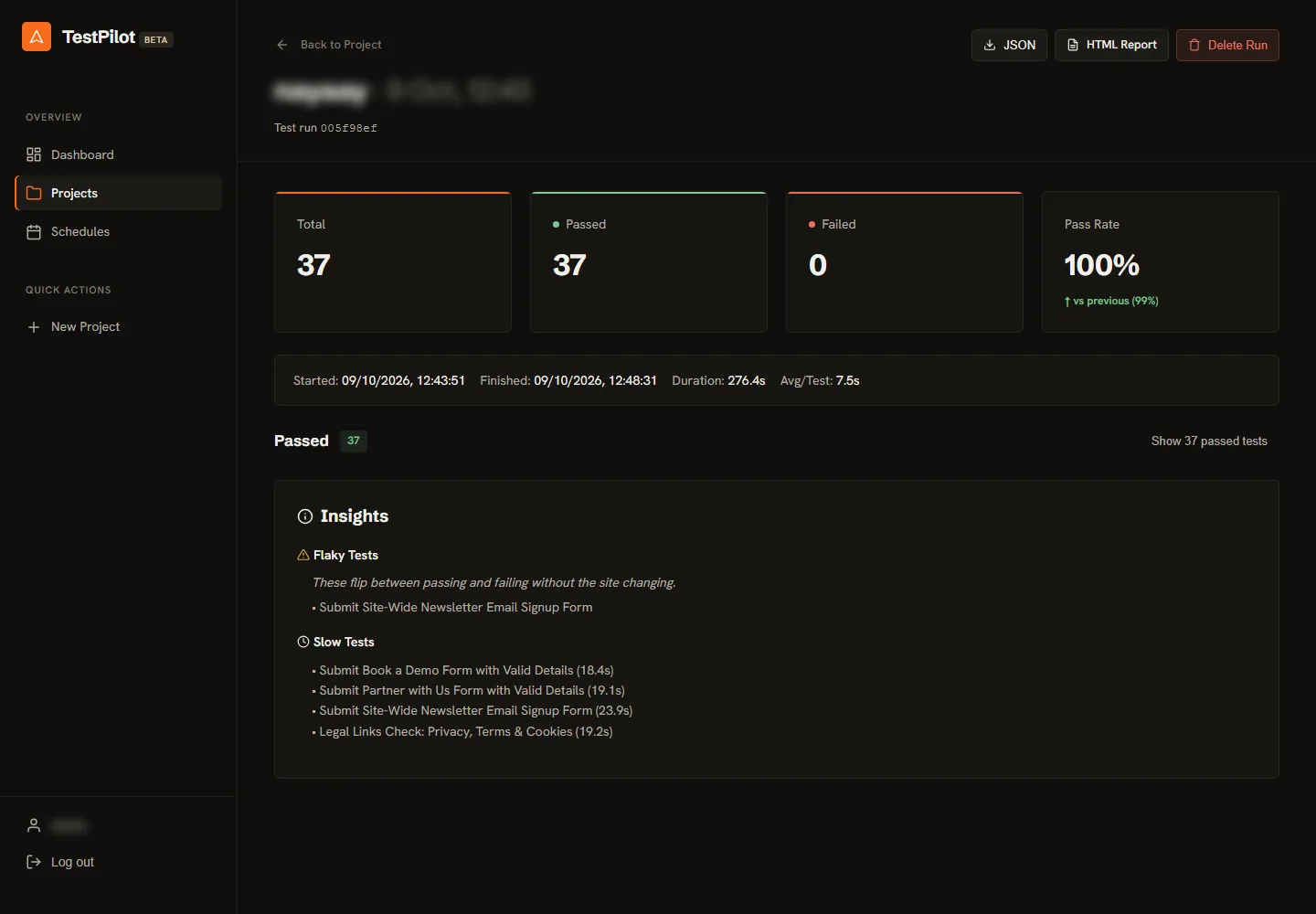
A run page with totals for tests, passed and failed, the pass rate compared with the previous run, timings, and insights listing a flaky test and the slowest tests
A run page: totals and timing, the change from the previous run, and insights: a test that flips between passing and failing, and the slowest ones. Full screenshot

Tell us about your websites.

See which of these fits your team, and what TestPilot finds on your own site.